By pteexamprep editorial teamPublished 9 Oct 2026Updated 10 Oct 2026Reviewed 10 Oct 2026 against official sources
PTE results are usually available within two days of your test, and can take up to five working days. Pearson sends you an email when your score is ready. To see it, sign in to your myPTE account, click View Score, and download the PDF. There is no official way to look up a PTE result with your passport number. This guide explains the timing, how to check, how to send your score to universities and visa offices, and how rescoring and retakes work.
This is an independent guide. PTE is a Pearson test, and every date and fee here comes from Pearson's own help pages, which we checked on 9 October 2026. Confirm your details in myPTE before you act on them.
How long does a PTE result take?
Pearson says most results are ready within two days. The table below shows what to do if yours is later than that.
| Time since your test | What Pearson says | What to do |
|---|---|---|
| Up to 2 days | Usually ready | Watch your email and myPTE |
| 3 to 5 working days | Can take this long | Keep waiting. Pearson says it can take this long |
| Over 5 working days | Contact Pearson if it still has not arrived | Check spam, sign in to myPTE, then use the Customer Support form |
Pearson names two reasons a result can take longer than five working days. The first is a certainty review, where the system flags a result for extra review. The second is a security check, where Pearson confirms that the person who took the test is who they say they are before it releases a score. Separately, Pearson's retake policy warns that creating a new account to get around its rules delays the release of future scores, so keep using the account you booked with.
How to check your PTE result online
- Wait for the email. Pearson emails you when the score is ready. Check your spam or junk folder too.
- Sign in to myPTE at mypte.pearsonpte.com with the account you booked with.
- Click View Score on the homepage. If you cannot see it there, go to My Activity, find the test, and click View Score.
- Download the PDF and save it. Your score report is only available for two years.
If you were told your score is ready but cannot see it, or the page shows a technical message about photos, run the report again later. Pearson says it should appear within 24 hours. If it still does not show, use the Customer Support form, which is faster than phone or live chat for this issue.
Can I check my PTE result with my passport number?
No. Pearson's official ways to find a score are:
- Your myPTE login, which shows your own score report.
- The Score Report Code, a 10-character code at the top of your report. Institutions use it on Pearson's score review website.
- The Registration ID, a 9-digit number under your name on the report. It only works for an institution if you have sent your score to that institution through myPTE.
Your passport matters on test day, when you show it at the test centre to match your booking. It is not a way to look up a score online.
Score Report Code vs Registration ID
Institutions use one of two numbers to find your score on Pearson's Score Report Website. They work differently.
| Score Report Code | Registration ID | |
|---|---|---|
| Format | 10 characters, letters and numbers or just numbers | 9 digits |
| Where it is printed | Top of the score report | Under your name on the report |
| Needs you to send the score first? | No. The institution can look it up directly | Yes. It only works if you shared the report with that institution in myPTE |
Pearson says institutions can retrieve a report with the Score Report Code for up to three years. Your own access in myPTE still ends after two years.
What is on your score report?
The score report includes the following details:
- The name of the test in the header
- Your photo and personal details, so an institution can check the report belongs to you
- An overall score from 10 to 90
- Communicative skills scores for reading, writing, listening and speaking
- The test date and the date the report stays valid until
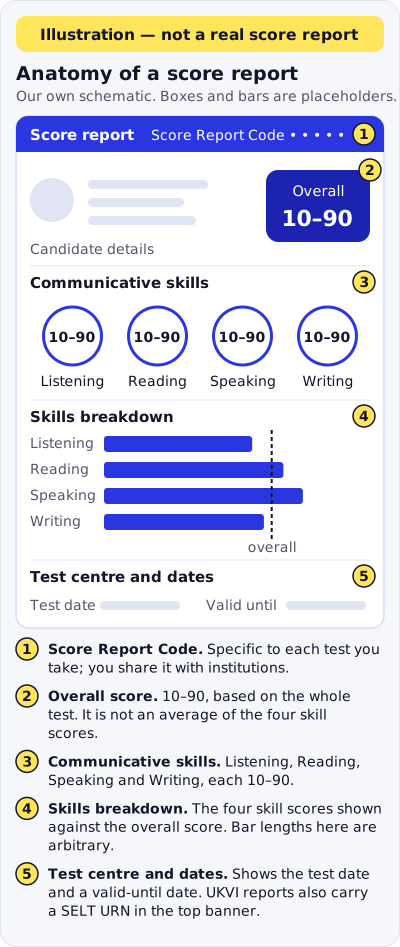
Text version of this diagram
- Illustration only; this is our own schematic, not a real score report and not Pearson artwork.
- 1. Score Report Code: specific to each test you take, used to share the report with institutions.
- 2. Overall score: 10–90, based on performance across the entire test; it is not an average of the four skill scores.
- 3. Communicative skills: Listening, Reading, Speaking and Writing, each scored 10–90.
- 4. Skills breakdown: the four skill scores shown against the overall score.
- 5. Test centre and dates: the test date and a valid-until date. A PTE Academic UKVI report also carries a SELT URN in the top banner.
To understand what the numbers mean, see our PTE score chart and our PTE passing score guide. Both explain how to read your scores against common requirements.
How to send your score to universities and visa offices
Where you send your score depends on where you are applying. Use the table below to find the right route.
| Destination | How the score gets there | What to check |
|---|---|---|
| Universities (PTE Academic) | Send it in myPTE with Send Scores, or share the Score Report Code | Institutions cannot accept paper or PDF copies. The school usually sees the score about 48 hours after you send it |
| Canada, IRCC (PTE Core) | Enter the IRCC Unique Reference Number from your report on the visa form | Use the number shown on your own report |
| Australia, DHA, or New Zealand, INZ | If you ticked the box at booking, your score is sent automatically | If you did not tick it, include the Test Registration ID on your application |
| UK, Home Office (PTE Academic UKVI) | Enter the SELT Unique Reference Number from your report on the visa form | Keep the report, because the number is printed on it |
To send a score in myPTE, go to My Activity, click Send Scores next to the test, search for the institution, tick it, and confirm. Pearson says you can send to an unlimited number of institutions free of charge. The send form accepts up to seven institutions at once, so submit it again for any others.
For visa routes, see our guides to PTE for Canada and PTE for Australia PR, which explain how each route uses the score.
How long is a PTE result valid?
Your score report is valid for two years from the date you took the test. After two years you cannot open the report or assign it to an institution. If a university or visa route needs a score, check its own validity rule as well, because some ask for a shorter period.
Rescore, technical review, appeals and retakes
Not every change to a score is free or quick. Use this table to compare the options.
| Option | What it does | Fee | Deadline |
|---|---|---|---|
| Rescore | A human rater re-scores the whole test. The score can go up, down or stay the same | USD 160. The rescore fee is refunded if your overall or communicative skills score changes. The test fee is not | Phone Customer Support within 14 calendar days of your score being available |
| Technical review | Checks the audio for technical problems that may have affected a speaking score. It does not change scores | USD 50, paid before the review | Within 15 business days of your results |
| Appeal | Checks whether Pearson's procedures were followed. It does not re-assess the test | See Pearson's appeals policy | Only after a rescore, a technical review, or a malpractice decision |
| Retake | Book another test | Standard test fee | Only after you receive your last scores. Up to six months ahead |
A few rules matter before you act:
- A rescore can lower your score. If you have already sent the score to a university or visa office, you must tell them about any change.
- You can request a rescore once per test registration, and only for your most recent test.
- You cannot request a rescore if you have already booked another test.
- Retakes are limited to one booking at a time, and up to 12 times within a 12-month window. Pearson's exception form covers extra attempts.
- Do not create a new Pearson account to get around these rules. Pearson says it delays results and can count as a breach of its malpractice policy.
Fees and deadlines are taken from Pearson's policy pages. Check them again on Pearson's website before you pay.
PTE result timeline at a glance
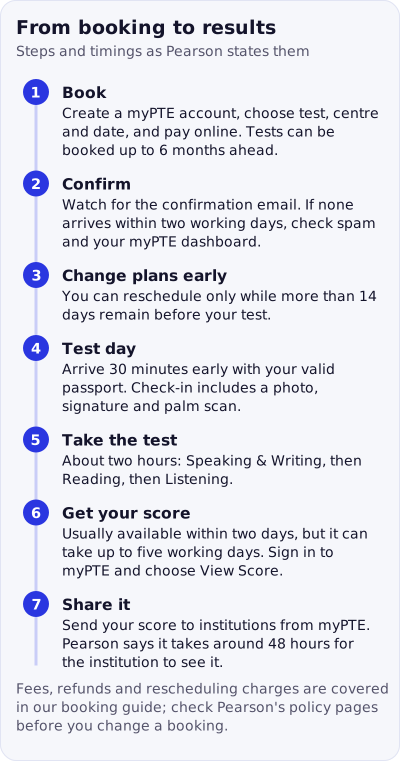
Text version of this diagram
- 1. Book: create a myPTE account, choose test, centre and date, and pay online. Tests can be booked up to 6 months ahead.
- 2. Confirm: if no confirmation email arrives within two working days, check spam and your myPTE dashboard.
- 3. Change plans early: you can reschedule only while more than 14 days remain before your test.
- 4. Test day: arrive 30 minutes early with your valid passport; check-in includes a photo, signature and palm scan.
- 5. Take the test: about two hours.
- 6. Get your score: usually within two days, up to five working days; sign in to myPTE and choose View Score.
- 7. Share it: send your score from myPTE; it takes around 48 hours for the institution to see it.
| Step | Timing |
|---|---|
| Score is ready | Usually within two days, up to five working days |
| Score report available in myPTE | As soon as the score is released |
| Institution sees a shared score | About 48 hours after you send it |
| Score report stays valid | Two years from the test date |
| Rescore request by phone | Within 14 calendar days of the score being available |
| Technical review request | Within 15 business days of your results |
| Next test booking | After you receive your last scores, up to six months ahead |
Preparing for your next PTE attempt
If your result is not where you want it, use practice before you book again. Our PTE exam pattern guide explains each task, and the PTE mock test gives you a full run-through. You can also practise each question type in the free practice hub.
Related reading
- How to book the PTE exam
- PTE exam fee and rescore cost
- PTE exam overview and PTE Core for Canada
- PTE Academic vs Core vs UKVI, since the way a score is shared depends on the test version
- Countries and institutions that accept PTE
Frequently asked questions
How long does a PTE result take?
Pearson says PTE results are usually available within two days of your test, and can take up to five working days. Results that are flagged for an extra check, or that need an identity check, can take longer. If you have not received your result after five working days, check your spam folder, sign in to myPTE, and then contact Pearson through its Customer Support form.
How do I check my PTE result?
Wait for the email from Pearson saying your score is ready. Then sign in to your myPTE account, click View Score on the homepage, or go to My Activity and select View Score next to the test. You can download the score report as a PDF to save or print.
Can I check my PTE result with my passport number?
No. Pearson's official ways to find a score are your myPTE account login, the Score Report Code printed on your report, or the 9-digit Registration ID under your name on the report. Passport numbers are not used as a score lookup. Any site that asks for your passport number to show your score should not be trusted.
PTE exam ka result kab aata hai?
PTE results are usually released within two days after your test, and sometimes take up to five working days. Pearson sends an email when the score is ready. You then sign in to myPTE to view it.
PTE result kaise check karein?
Sign in to your myPTE account at mypte.pearsonpte.com, go to your test activity, and select View Score. Use the same account you booked the test with. Pearson's retake policy says creating a new account to get around its rules delays the release of future scores.
When does the result of the PTE exam come?
Usually within two days, and up to five working days in some cases. Pearson does not promise a fixed release date, so do not plan travel or application deadlines around one exact day. Check your email and myPTE, and contact Pearson if five working days pass.
How long is a PTE score valid?
Your Score Report is valid for two years from the date you took the test. After that you cannot access the result or assign it to an institution, so save a PDF copy of your score report when it is released.
Can I send my PTE result to more than one university?
Yes. Through myPTE, you can send your PTE Academic score to an unlimited number of institutions, free of charge. Pearson's send form takes up to seven institutions per submission, so repeat the steps if you need more. The institution can see the score about 48 hours after you send it. Institutions do not accept paper or PDF copies of the score report.
Can I get my PTE score changed?
You can ask for a rescore for a fee of USD 160. A human rater re-scores the whole test, and the score can go up, go down or stay the same. The request has to be made by phone with Customer Support within 14 calendar days of the score being available. You can only request one rescore per test registration. For a technical problem with the speaking audio, you can request a technical review for USD 50 within 15 business days of your results. A technical review does not change your scores.
Can I retake the PTE test if I do not like my result?
Yes. You can book a new test once you have received your last scores. You can only book one test at a time, you can book up to six months ahead, and you can take the test up to 12 times in a 12-month window. Pearson's retake policy explains how to request an exception if you need more attempts.
Official sources
- pearsonpte.com/help-center/scoring/ (checked 2026-10-09)
- pearsonpte.com/accept-pte/scoring/verify-scores/ (checked 2026-10-09)
- pearsonpte.com/policy-center/rescore-policy/ (checked 2026-10-09)
- pearsonpte.com/policy-center/retake-policy/ (checked 2026-10-09)
- pearsonpte.com/pte-academic/ (checked 2026-10-09)
- pearsonpte.com/pte-academic/score-guide (checked 2026-10-10)
- pearsonpte.com/help-center/booking-managing-test/ (checked 2026-10-10)
- pearsonpte.com/on-test-day/ (checked 2026-10-10)